Signing in on Behalf of an Adviser
Step 1:
Click on the cog icon in the top right-hand corner of the Portal screen to access the Maintenance Panel:
Step 2:
Once you have accessed the Maintenance Panel, click on the option for 'Adviser Companies':
Step 3:
Next, select the Adviser Company you wish to add the new Adviser to using the eye icon:
Step 4:
Once you have accessed the relevant Adviser Company's record, click on the option for 'Advisers':
Step 5:
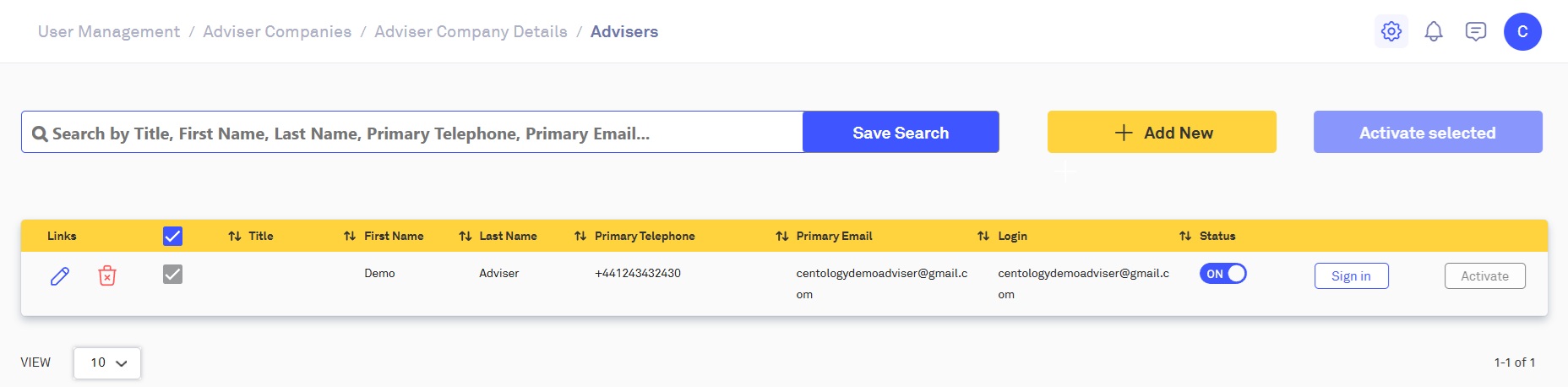
This will bring you to the Advisers page, here you can sign in as an Adviser using the 'Sign in' button:
Step 6:
Once you have clicked the 'Sign in' button you will be able to access the Adviser's Portal record, here you can view the Adviser's Dashboards as well as check their chat messages.
Related Articles
Submitting Forms on Behalf of Clients
In some cases, it may be beneficial for Advisers and Adviser Administrators to sign and submit forms on behalf of a client if a physical form has already been signed. Step 1: Open the Navigation Bar and click on 'Clients', then from the dropdown ...Signing in on Behalf of a Private Client
Step 1: Open the Navigation Bar and click on 'Clients', then from the dropdown menu, select 'Private Clients': Step 2: This will take you to the 'Private Clients' page. Here you can search for clients by their name and/or email address: To sign in as ...Creating an Adviser
Before creating an Adviser, you must first create an Adviser Company, for information on how to do this please read: Creating an Adviser Company Step 1: Click on the cog icon in the top right-hand corner of the Portal screen to access the Maintenance ...Creating an Adviser Administrator
Before creating an Adviser Administrator, you must first create an Admin User, Adviser Company and an Adviser, for information on how to do this please read: Creating an Admin User, Creating an Adviser Company & Creating an Adviser Step 1: Click on ...Creating an Adviser Company
Before creating an Adviser Company, you must first create an Admin User, for information on how to do this please read: Creating an Admin User Step 1: Click on the cog icon in the top right-hand corner of the Portal screen to access the Maintenance ...