Centology Portal - Transaction History
The Centology Portal's Transaction History allows you to view the transactions to date for a given client's plans.
Step 1:
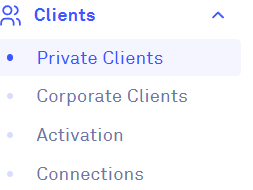
Open the Navigation Bar and click on 'Clients', then from the dropdown menu, select 'Private Clients':
Step 2:
This will take you to the 'Private Clients' page. Here you can search for clients by their name and/or email address:
To access a client's Transaction History, click on the chart icon to the left-hand side of their Portal record:
Step 3:
Once on a client's Transactions History, the default view will show you all the transactions for all the client's plans with the most recent transactions at the top:
You can use the 'From' and 'To' date filters to view the transactions between specific dates:
The Transactions History also features filters on all of the columns, allowing you to order the transactions by 'Plan Name', 'Plan Reference', 'Fund', 'Transaction Type', 'Transaction Date', 'Units', 'Price', and 'Valuation':
Step 4:
Transactions can be exported to a Microsoft Excel spreadsheet by clicking on the 'Export to Excel' button:
Related Articles
Centology Portal - Private Clients Page
Upon logging into the Portal, Administrators and Adviser Administrators will be greeted with the 'Private Clients' page. This will display a list of all of your clients: The Private Clients page has filters to help you to alphabetically sort clients ...Centology Portal Overview
Please note that the following view/guide is intended for Adviser Administrator users only. Clients will be greeted with a different view of the Centology Portal when they log-in. Navigation Bar: The Centology Portal features a Navigation Bar on the ...Centology Portal - Forms Overview
The Centology Portal benefits from having online forms housed directly inside the Portal, to allow for increased efficiency, data security and ease for Advisers, Adviser Administrators and Clients. To access the Forms page on the Centology Portal, ...Centology Portal Log-in
Please only use the below guide after you have set up your own password for log-in. For more information on how to set up your own password for log-in, please read: First Time Log-in to The Centology Portal Step 1: You can log-in to the Centology ...Centology Portal - Securities
Investment securities are tradable financial assets, like stocks, bonds, and derivatives, purchased by individuals and institutions to generate income or capital growth, serving as a way for companies and governments to raise funds. Accessing ...